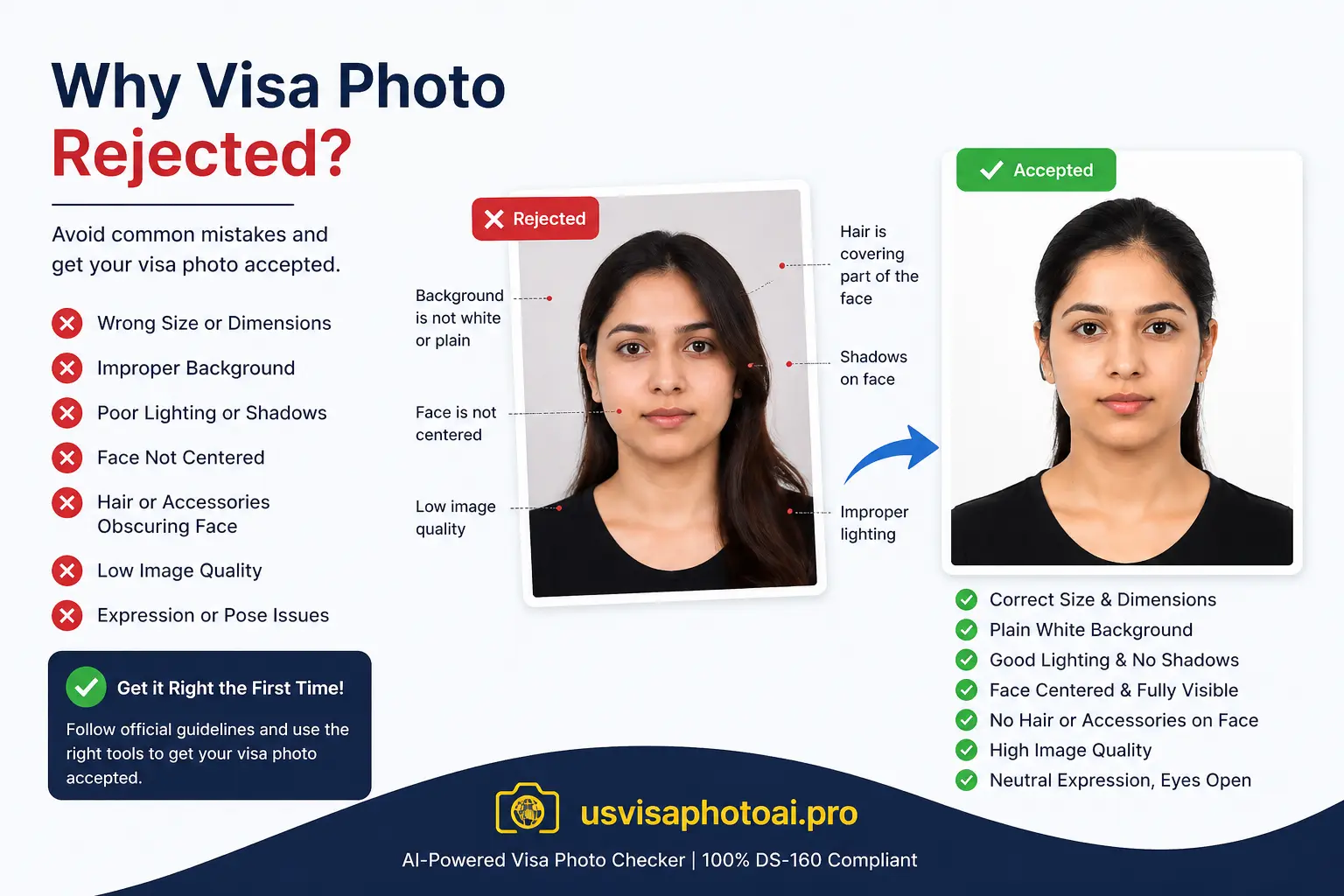
Why Visa Photos Get Rejected — And Why It Matters More Than Ever in 2026
A visa photo rejection is almost never about your visa case being weak. According to the U.S. Department of State, photo problems are a technical compliance issue — but they carry real consequences. A failed upload means your DS-160 confirmation page shows an X instead of your photo. A rejection at the embassy interview can mean hours lost or a full reschedule. And in 2026, the rules tightened further with an expanded ban on AI-enhanced images that now catches more applicants than ever.
The good news: every rejection reason on this list is completely preventable if you know what to look for before you submit.
| Rank | Rejection Reason | Primary Cause |
|---|---|---|
| #1 | Wrong Background Color | Gray, cream, or beige wall photographing off-white |
| #2 | Incorrect Head Size | Head outside the 50–69% image height range |
| #3 | Background or Face Shadows | Standing too close to the wall or poor lighting |
| #4 | Wrong File Size or Format | File over 240KB or not a true JPEG |
| #5 | AI Editing or Filters | Banned by State Department since January 2026 |
1. Wrong Background Color
According to PixID's analysis of validation outcomes, wrong background color is the single most common rejection cause, accounting for 31% of failures. The State Department requires a plain white or off-white background with no patterns, textures, or gradients. The problem is that cream, beige, and light gray walls often look white in person but photograph noticeably off-white. Automated systems flag this instantly. The fix: use a true white background, or use a background replacement tool that outputs a verified white canvas.
2. Incorrect Head Size
Your head — measured from the bottom of your chin to the top of your hair — must occupy between 50% and 69% of the total image height. This is responsible for approximately 24% of photo rejections. Standing too far from the camera makes your face too small; taking a selfie-style close-up makes it too large. Both trigger an automated size alert on the CEAC portal. A proper visa photo maker detects your facial landmarks and frames the image correctly without any guesswork.
3. Shadows on the Background or Face
Shadows account for around 18% of photo rejections. The State Department's photo examples page explicitly marks shadowed backgrounds as unacceptable. Standing too close to a wall causes your body or head to cast a dark silhouette behind you. Overhead lighting creates shadows under the eyes and nose. The fix for background shadows: stand at least two to four feet from your background and use even, diffused light facing you directly — natural window light works best. Face shadows that are severe cannot be corrected digitally and require a retake.
4. Wrong File Size or Format
For DS-160 submissions, your photo must be a JPEG file under 240KB. File size and format issues cause approximately 14% of rejections. The CEAC portal silently rejects oversized files — you won't always get a clear error. iPhone users face an additional problem: the DS-160 portal only accepts JPEG, but iPhones save photos in HEIC format by default. A renamed HEIC file is not the same as a true JPEG and will be rejected. Additionally, over-compressed files lose the fine detail at facial landmarks — eyebrow edges, skin texture — that biometric mapping requires.
5. AI Editing and Digital Filters — New for 2026
This is the fastest-growing rejection reason in 2026. The State Department first banned AI enhancement in 2024, then significantly expanded the rule in January 2026 to explicitly prohibit photos generated, enhanced, or modified by any AI tool. This includes AI-generated photos, AI-powered beauty filters, and the automatic AI smoothing that many modern smartphones apply by default without the user knowing. The rule exists because AI alterations compromise the accuracy of biometric identity verification used by both the Department of State and the Department of Homeland Security.
🛑 Check Your Phone's Default Settings
Many modern smartphones silently apply AI skin smoothing and face enhancement by default in their camera apps. Before taking your visa photo, turn off any 'Beauty', 'Portrait', or 'AI Enhancement' modes in your camera settings. Submitting a photo with these filters active — even unknowingly — can result in rejection under the 2026 AI editing ban.
6. Wearing Glasses
The U.S. Department of State has prohibited eyeglasses in visa and passport photos since November 1, 2016. This applies to all types — prescription, reading, tinted, and transition lenses. The rule exists because lens glare, reflections, and frame edges obscure the biometric tracking points around your eyes, making facial recognition less reliable. The only exception is a documented medical necessity supported by a signed statement from a licensed doctor. Digitally removing glasses from an existing photo is not an acceptable workaround — you must retake the photo.
7. Head Tilt or Rotation
The State Department requires your photo to be a clear, front-facing shot with your head centered horizontally. Even a slight tilt or turn changes the measured distance between your eyes and other facial landmarks, making biometric alignment fail. Profile shots or photos not in focus are explicitly listed as unacceptable.
8. Incorrect or Exaggerated Facial Expression
The State Department requires a neutral expression with both eyes open and directly facing the camera. A natural, slight smile is generally acceptable, but an exaggerated open-mouth smile or any expression that causes significant squinting will be rejected. Closed or squinting eyes are specifically called out in the State Department's photo FAQ as grounds for rejection.
9. Inappropriate Clothing or Head Coverings
Uniforms, clothing that resembles a uniform, and camouflage attire are not permitted. Head coverings are only allowed for documented religious or medical reasons, and even then your full face must be clearly visible with no shadows cast by the covering. Never wear white clothing — it blends into the required white background and creates composition errors in the automated system.
10. Photo Is Outdated
Your photo must have been taken within the last 6 months and must reflect your current appearance. The State Department is explicit: even if a photo is technically under six months old, the embassy or consulate can request a new one if your appearance has changed significantly. Reusing a photo from a previous passport or visa application is one of the most common mistakes at in-person interviews.
Validate Before You Submit
Every rejection reason on this list is detectable before you upload — if you use the right tool. USVisaPhotoAI checks your image against all current State Department requirements: background color, head size, shadow detection, file format, JPEG authenticity, sRGB color profile, and the 240KB file size limit. Technical corrections — background replacement, cropping, and compression — are applied automatically. Your appearance is never altered. Submit with confidence, not guesswork.
Stop Guessing.
Perfect It in Seconds.
Our algorithm simulates the exact scanners used by the US Department of State. Ensure your 600x600 photo passes on the first try.