Loading...
Loading...
The most accurate US visa photo tool free online — built to the exact pixel standards published by the U.S. Department of State. Validate, crop, and resize your photo for DS-160, DV Lottery, Green Card, and USCIS applications in under 30 seconds.
Official 2026 Standards
All values sourced directly from the U.S. Department of State official photo guidelines. This USCIS photo tool and travel.state.gov photo tool validator enforces every one of these rules automatically.
| Specification | Required Value | Detail / Notes | Auto-Checked |
|---|---|---|---|
| Dimensions | 600 × 600 px | Square 1:1 aspect ratio. Pixel dimensions must be exact. | ✓ Yes |
| File Size | Max 240 KB | JPEG format only. DV Lottery enforces this limit strictly. | ✓ Yes |
| Format | JPEG (.jpg) | PNG, HEIC, WebP are not accepted. Must be JPEG. | ✓ Yes |
| Background | Plain White / Off-White | No shadows, patterns, gradients, or other people. | ✓ Yes |
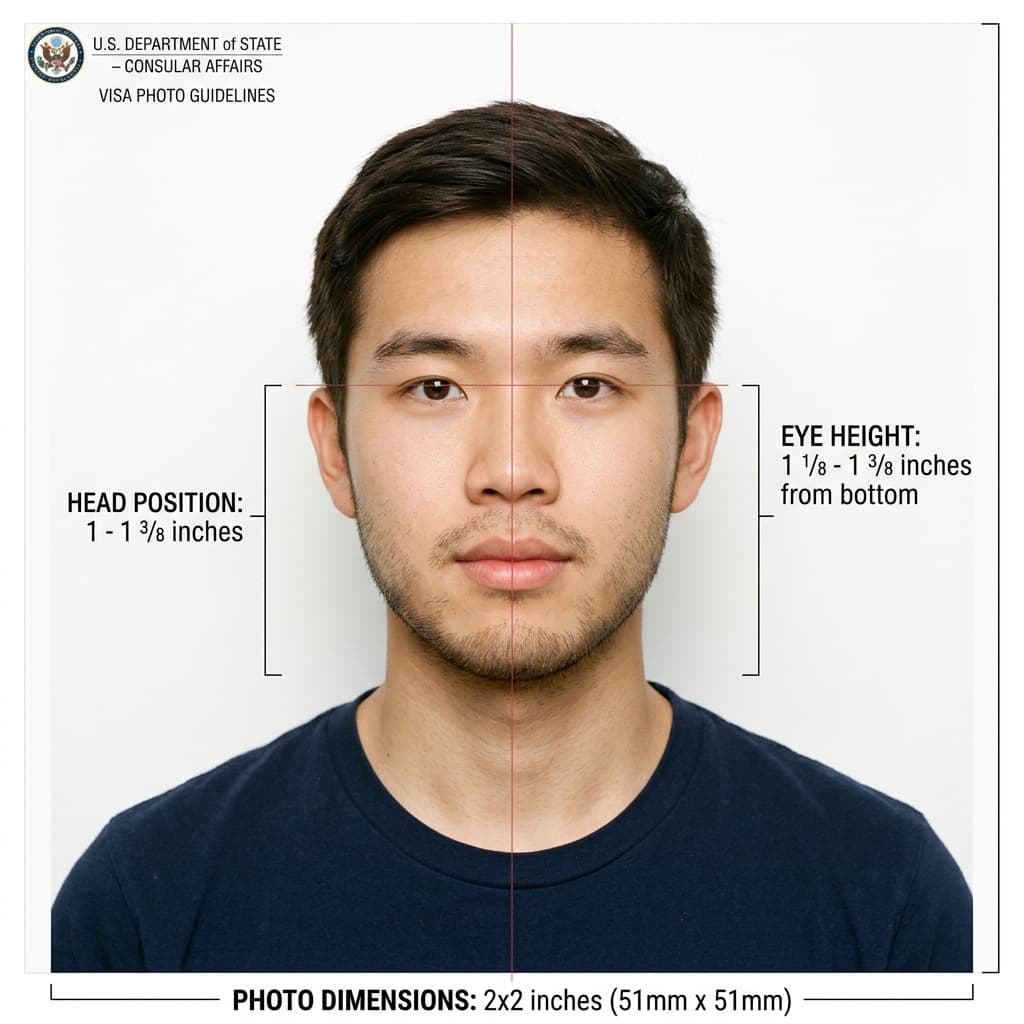
| Head Size | 50% – 69% | Crown-to-chin as a proportion of total image height. | ✓ Yes |
| Eye Position | 56% – 69% | Measured from the bottom of the image to the center of the eyes. | ✓ Yes |
| Glasses | Not Permitted | Prohibited since 2016. Medical exception requires signed practitioner statement. | ✓ Yes |
| Expression | Neutral | Mouth closed, both eyes fully open, natural relaxed expression. | ✓ Yes |
| Head Covering | Not Allowed | Except for daily religious wear. Full face must remain visible. | ✓ Yes |
| Head Position | Centered, Forward | Face the camera directly. No tilting, turning, or angling. | ✓ Yes |
| Photo Age | Within 6 Months | Must reflect your current appearance. Color photo required. | Self-Check |
| Electronics | Strictly Prohibited | No headphones, earpieces, or wireless devices visible. | ✓ Yes |
ⓘ Final photo acceptance remains at the sole discretion of the U.S. Embassy or Consulate reviewing your application. Source: travel.state.gov
Step-by-Step Process
Our American visa photo cropping tool follows the same checklist used by the official State Department photo tool — with automated AI detection replacing the manual review step.
Stand in front of a plain white wall. Position your camera at eye level, approximately 4 feet away. Natural front-facing light is best — avoid flash shadows.
Remove glasses, hats, and headphones. Adopt a neutral expression with both eyes fully open and your mouth closed. Face the camera directly.
Upload your JPEG to our US visa photo tool free validator. Our AI checks every specification — dimensions, biometrics, file size, and background.
Receive a detailed PASS/FAIL report. Each individual check shows exactly what passed and what needs to be corrected before you apply.
Get your processed photo — cropped, resized to 600×600 px, compressed under 240 KB, and ready for DS-160, DV Lottery, or USCIS submission.
Ready to validate your photo?
Our USCIS photo crop tool works on any device — no installation needed.
By Application Type
Photo rules vary slightly depending on which form you are filing. This photo editor for visa applications covers all three main pathways below.
The DS-160 photo tool upload requires a digital JPEG file. Some U.S. consulates may additionally request one physical print at the in-person interview.
For immigrant visa applicants and Green Card adjustments processed through the NVC. Use this us green card photo editor and USCIS photo editor to ensure compliance.
The DV lottery photo tool applies the strictest standards. Non-compliant photos result in automatic disqualification with no resubmission. Use our photo tool for DV lottery before submitting.
Policy Alert
Eyeglasses have been prohibited in all U.S. visa and immigration photos since 2016. This applies to DS-160, DS-260, DV Lottery, and USCIS petitions.
The only permitted exception is a documented medical necessity supported by a signed statement from a licensed medical practitioner, submitted alongside the application.
Per State Department guidance, even a photo taken within 6 months may be rejected if your appearance has significantly changed. You must submit a new photo if you have experienced:
DIY Guide
You may take your own photo without visiting a photo studio. However, the State Department is explicit: photos must not be digitally altered to change your appearance. Our American visa photo tool only crops and resizes — it never alters your face.
Use your smartphone or a digital camera. Position it at eye level, approximately 4 feet (1.2 meters) away. Avoid wide-angle distortion from very close distances. Your head should fill 50–69% of the total image height.
Soft, even frontal lighting is required. Natural daylight from a window in front of you is ideal. Avoid overhead lighting, which creates shadows under the eyes and chin. Do not use on-camera flash.
Lay your baby on a plain white sheet, or drape white fabric over a car seat or flat surface. The infant must be the only person visible in the frame. No other person's hands or body should appear. The infant's eyes should be open.
Wear your everyday clothing. Uniforms are not permitted unless worn daily. Head coverings are not allowed except when worn daily for documented religious reasons — and in all cases, the full face must remain clearly visible.
Stand or sit at least 2 feet in front of a plain white wall. This distance prevents shadows from being cast onto the background. Do not use patterned wallpaper, colored walls, or curtains — these will cause automatic rejection.
The travel.state.gov photo tool allows basic 600×600 pixel cropping. However, a DOS officer makes the final acceptability determination. Our tool provides detailed automated compliance feedback before you submit.
Official Sources
All requirements in this us embassy photo tool are sourced from the following official U.S. government portals. Always verify the latest guidance before submitting.
Frequently Asked Questions
Questions about using our online US visa photo editor free tool, or about the official requirements. All answers are sourced from government publications.
The U.S. Department of State requires a square photo measuring 600 × 600 pixels for digital submissions. For physical prints (DS-260 immigrant visa interviews), the photo must be 2 × 2 inches (51 × 51 mm). The file must be in JPEG format and must not exceed 240 kilobytes. Source: travel.state.gov
U.S. passport photos and U.S. visa photos share identical biometric specifications — the same 2×2 inch (600×600 px digital) size, white background, head size ratios, and no-glasses rule. This us passport photo tool free validator will accurately check compliance for both. However, for passport applications submitted domestically, a physical 2×2 inch print is required. Source: State Department Passport Photo Requirements
No. The official travel.state.gov photo tool is operated by the U.S. Department of State and provides basic square cropping only — a human DOS employee reviews the output. USVisaPhotoAI.pro is an independent tool that provides automated AI-driven compliance checking against the same published standards, with detailed PASS/FAIL feedback on each requirement.
No. Eyeglasses have been prohibited in U.S. visa and immigration photos since 2016. This applies to all visa categories and all USCIS application types. The only exception is a documented medical necessity supported by a signed statement from a licensed medical practitioner. Our visa photo cropper automatically detects glasses and flags the photo as non-compliant. Source: U.S. Department of State
The DV lottery photo tool requirements are the strictest of any U.S. immigration application. The photo must be exactly 600 × 600 pixels, JPEG format, and must not exceed 240 kilobytes. Non-compliant photos result in automatic entry disqualification — there is no opportunity to resubmit. Source: dvprogram.state.gov
To resize a photo for a US visa: (1) Upload your photo to our US visa photo crop tool. (2) The tool automatically detects your face and crops the image so your head occupies 50–69% of the frame. (3) The image is resized to exactly 600×600 pixels and compressed to under 240 KB. (4) Download the JPEG file and upload it directly to the DS-160, DS-260, or DV Lottery portal.
The background must be plain white or off-white. Shadows, patterns, gradients, and colored walls are not permitted. Practically: stand at least 2 feet in front of a white wall in even, soft lighting to avoid shadows. Our USCIS photo editor automatically detects background color and flags any non-compliant backgrounds. Source: travel.state.gov
Yes. The State Department permits self-taken photos provided they meet all technical and biometric standards. A smartphone camera is sufficient. Key requirements: (1) plain white wall background, (2) soft even frontal lighting with no shadows, (3) camera at eye level approximately 4 feet away, (4) no digital alterations to your appearance. Our free US visa photo editor only performs geometric cropping and resizing — it does not alter your face, skin tone, or features.