Loading...
Loading...
100% compliant with U.S. State Department rules — or your money back. Avoid rejection, delays, and resubmission.
No signup required • Takes 30 seconds
Simple Process
From upload to a DS-160 ready file in under 60 seconds. Our US visa photo crop tool and USCIS photo editor handle every technical specification automatically.
Upload your photo directly from your phone or desktop. We accept JPEG, PNG, and HEIC formats.
Each photo is checked against all U.S. State Department specifications in seconds — no waiting.
See exactly which checks PASS or FAIL with clear reasons and specific fix suggestions for each.
One-time payment to unlock your processed, fully compliant photo download. No subscription.
Download your compliant, processed photo instantly. DS-160 upload ready in under 30 seconds.
Official Requirements
Every photo validated against official U.S. State Department requirements. This photo tool for US visa enforces the same standards as the travel.state.gov photo tool.
| Specification | Required Value | Notes |
|---|---|---|
| Dimensions | 600 × 600 px | Square 1:1 aspect ratio |
| Max File Size | 240 KB | JPEG format required |
| Background | Pure White | RGB (255, 255, 255) |
| Eye Position | 56% – 69% | From bottom edge of image |
| Head Size | 50% – 69% | Crown to chin ratio |
| Expression | Neutral | Mouth closed, both eyes open |
Biometric Requirements are Critical
The most common rejection reasons are incorrect eye position and head size. Your face must be centered, looking directly at the camera with a neutral expression. No glasses, head coverings (except religious/medical), or shadows on the face. Source: travel.state.gov
Verified by Official Sources
Every requirement enforced by this USCIS photo tool comes directly from official U.S. Department of State and USCIS publications. No guesswork — only authoritative specifications.
When in doubt, always verify at travel.state.gov or uscis.gov.
Knowledge Base
Access our comprehensive directory of visa photo requirements, country-specific rules, and expert articles covering every US immigration document type.
Why Photos Get Rejected
The U.S. Department of State rejects thousands of visa applications annually due to non-compliant photos. Here are the most frequent failures our US visa photo validator and photo cropping tool for US visa automatically catch.
Off-white, cream, gray, or shadowed backgrounds fail the pure white (RGB 255,255,255) standard. Even a subtle shadow behind your ears is enough to trigger rejection.
Your eyes must sit between 56% and 69% from the bottom of the image. Photos taken too close or too far from the camera shift this ratio outside the allowed range.
Head height (crown to chin) must fill 50%–69% of the image. Cropping too tight or leaving too much empty space above the head are common errors.
Since November 2016, the State Department bans all eyewear in US visa and passport photos. Prescription glasses, tinted lenses, and photochromic lenses are all prohibited.
Uneven lighting creates shadows across the face or cast onto the background. This is particularly common with phone cameras and indoor lighting.
DS-160 enforces a strict 240KB file size cap and requires JPEG format. PNG and HEIC files must be converted. Uncompressed JPEGs often exceed the size limit.
Hats, caps, visors, and fashion head coverings are not permitted. Religious head coverings are allowed but must not obscure facial features.
Eyes must be open and looking straight ahead. Downward gaze, looking to the side, or closed/squinting eyes will cause failure.
DS-160 requires at minimum 600×600 pixels in a square 1:1 ratio. Portrait or landscape crops fail immediately.
Document-Specific Guidance
While core specifications overlap, each U.S. immigration document has unique nuances. Our American visa photo tool and ds 160 photo tool cover all document types listed below.
The DS-160 online form has a strict photo upload validator. Failing at the form stage after completing the entire application is frustrating — validate here first.
The DV Lottery is particularly unforgiving. A non-compliant photo doesn't delay your entry — it permanently disqualifies you for that year. There is no correction mechanism.
Online passport renewal uses the same digital 600×600px spec. Mail-in renewals require a physical 2×2 inch print — our A4 print sheet includes 20 correctly-sized photos.
USCIS typically requires two physical 2×2 inch photos mailed with your application. Our A4 print-ready sheet makes this simple — print and cut at home.
H1-B, H4, L1, F1, J1, O1, and B1/B2 visa photos all use the DS-160 standard. One validated photo works for any of these applications.
Expert Guidance
You don't need a professional photographer. Follow these evidence-based tips and your smartphone photo will pass every State Department check — first time.
Position yourself facing a window with natural daylight. This creates even, shadow-free illumination. Avoid overhead lights, which cast downward shadows on the nose and chin. Avoid lamps behind you, which create dark backgrounds.
iPhone and Android portrait modes add artificial bokeh blur to the background. This can corrupt the pure-white RGB requirement. Use standard photo mode and stand against a white wall or door instead.
Stand approximately 3–5 feet from your camera or phone. Too close and your head fills the entire frame (head size > 69%). Too far and your head is too small (< 50%). Have someone else take the photo rather than a selfie.
Tape a large white poster board or sheet to a wall. Stand at least 3 feet in front of it to prevent your shadow from falling onto it. A white door works well too. Avoid paper with any texture, watermarks, or slight cream tones.
Look at the camera lens — not the screen. On phones, the lens is above the screen. Looking at the screen preview causes a subtle downward gaze that fails the eye direction check. Have someone count down before they take the shot.
Remove glasses, earrings, face jewelry, headphones, and AirPods. Tie back hair so ears are fully visible. Remove hats and caps. Religious head coverings are permitted but must not shade the face or obscure the hairline.
Pro Tip: After taking your photo, upload it to our free validator before paying anything. You'll see an instant PASS/FAIL report with the exact reason for any failure — so you can retake and re-upload until it's perfect, completely free.
Why Us
See why thousands choose our online US visa photo editor free tool over photo studios and other online services for their DS-160, DV Lottery, and USCIS applications.
| Feature | USVisaPhotoAI | Photo Studio | Other Online Tools |
|---|---|---|---|
| Price | $6.99 one-time | $15–$25 + travel | $3–$15 per photo |
| DS-160 Upload Ready | ✅ Yes | ⚠️ Not always digital | ⚠️ Varies |
| Eye Position Check (56–69%) | ✅ AI-measured | ❌ Human eye only | ⚠️ Basic only |
| Head Size Check (50–69%) | ✅ Pixel-precise | ❌ Not measured | ⚠️ Crop only |
| Background RGB Validation | ✅ 9-zone analysis | ❌ Visual only | ⚠️ Basic removal |
| Glasses Detection | ✅ Auto-detected | ❌ Manual reminder | ⚠️ Not always |
| Free Validation Before Paying | ✅ Always free | ❌ Pay upfront | ❌ Pay upfront |
| A4 Print Sheet (20 photos) | ✅ Included | ✅ Printed for you | ❌ Extra cost |
| 24-Hour Photo Deletion | ✅ Auto-deleted | ⚠️ May retain copies | ⚠️ Unknown |
| Processing Time | Under 30 seconds | 15–30 minutes | 1–5 minutes |
| Available 24/7 | ✅ Yes | ❌ Business hours | ✅ Yes |
Simple Pricing
Photo studios charge $10–$20 + travel time. Get the same compliant photo here in 30 seconds for just $6.99.
Free Includes:
Paid Includes:
No account required · One-time payment
All Tools
600×600px, 240KB max, white background. Fully compliant with DS-160 requirements.
Use Tool →Green Card LotterySame as visa specs with strict eye level validation. Ready for DV-2027 applications.
Use Tool →Passport Renewals600×600px digital photo for online submissions. DIY printable 2×2 inch option.
Use Tool →Permanent Residence2×2 inch compliant photo. No glasses allowed. Correct biometric positioning.
Use Tool →Quick Compliance CheckValidate any US document photo for free. Instant PASS/FAIL report, no payment needed.
Use Tool →Your Privacy Matters
All original photos are automatically and permanently deleted after 24 hours.
Download URLs are signed and expire after 1 hour. No permanent access.
Full data deletion options. We comply with global privacy regulations.
Processed images are never stored after download. Your data is yours.

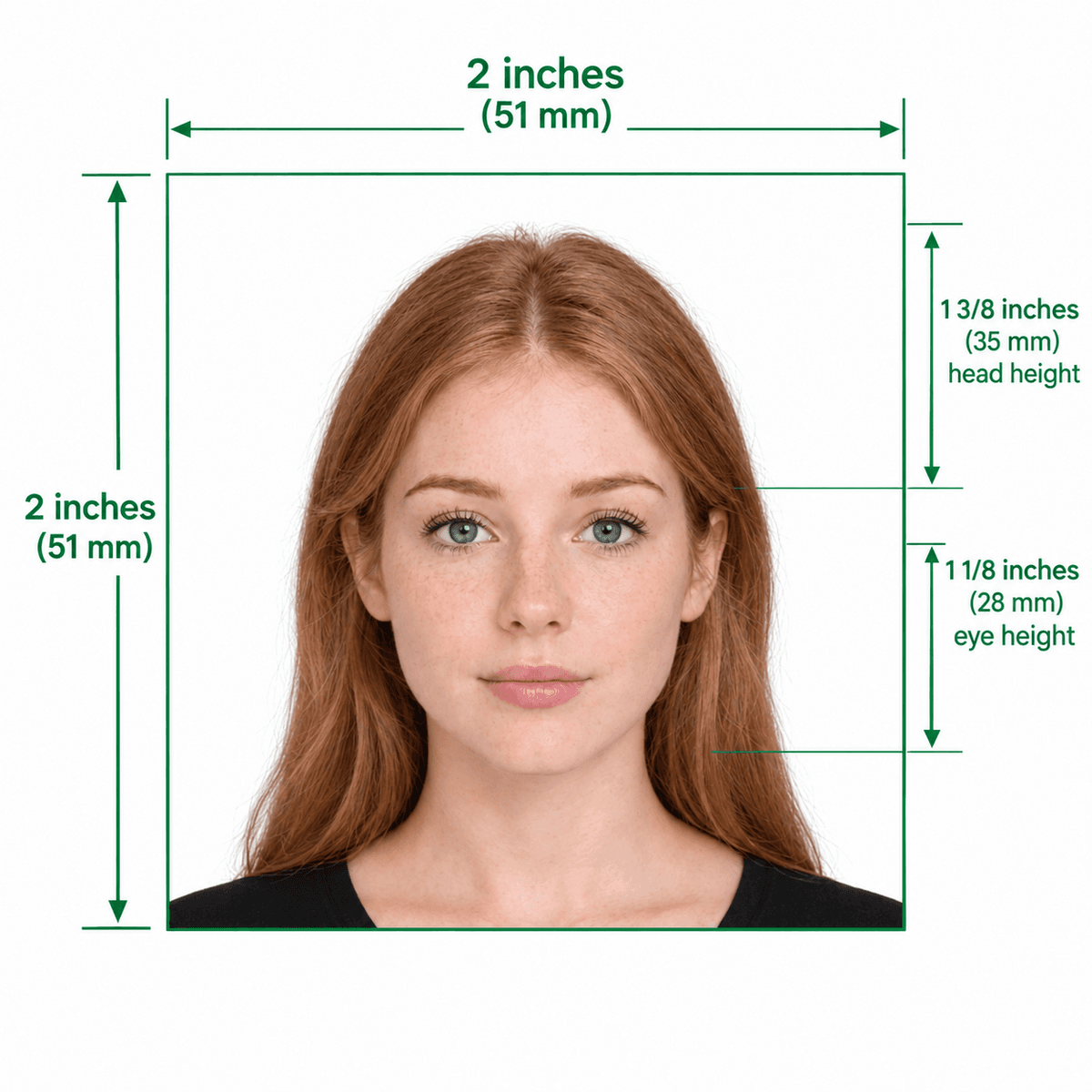
Example: DS-160 compliant 600×600px photo
Why AI Precision Matters
Securing a U.S. Visa (DS-160) or entering the Diversity Visa (DV) Lottery is a life-changing milestone for thousands of applicants every year. However, a single non-compliant photograph is often the hidden culprit behind sudden rejections or long administrative delays. Our US visa photo tool free platform bridges the gap between amateur smartphone photography and the rigorous biometric standards demanded by the U.S. Department of State — the same standards enforced at every U.S. Embassy and consulate worldwide.
Modern embassy systems use advanced facial recognition algorithms to verify identities at the port of entry. These systems aren't just looking for a good picture — they require specific geometry. Your eyes must be positioned between 56% and 69% from the bottom edge of the image, and the head must fill exactly 50% to 69% of the frame height. Even a 1% deviation can trigger an automatic flag. Our USCIS photo editor and America visa photo tool scans 64 unique facial landmarks in under five seconds. Source: travel.state.gov
While most applicants know they need a white background, achieving truly pure white (RGB 255,255,255) is harder than it looks. Shadows behind the ears, hot spots from camera flashes, or subtle tints from indoor lighting are the most frequent reasons a photo cropping tool for US visa validation fails. The 2016 no-glasses policy is strictly enforced at every consulate. Our American visa photo cropping tool performs a deep-level luminance analysis across nine background zones to ensure your background is truly neutral — not just visually white.
Whether you need a ds 160 photo tool for your nonimmigrant visa interview, a photo tool for DV lottery entries, a us passport photo tool free for online passport renewal, or a green card photo editor for Form I-485 — this single platform covers them all. Our visa photo cropper automatically detects which requirements apply and applies the correct crop ratios, file size limits, and biometric checks for each document type.
Unlike photo studios or competing online US visa photo editor free services that charge upfront, our photo validator DV lottery and US visa photo check tool are completely free to use. You only pay $6.99 to download your processed, fully compliant photo — after you've already seen the detailed PASS/FAIL compliance report. Retake and re-upload as many times as you need, at no charge.
The official travel.state.gov photo tool provides basic square cropping — a human DOS employee then makes the final compliance decision. Our US embassy photo tool gives you automated, pixel-precise feedback on every single requirement before you submit. This means fewer surprises, zero rejected applications, and no wasted embassy appointment fees. It functions as your personal uscis photo crop tool, visa lottery photo tool, and travel state gov photo tool replacement — all in one.
Don't risk rejection. Use our free US visa photo validator — validate for free, download your DS-160 ready file in under a minute.
Check Your Photo Free →No account required · Free validation · $6.99 to download
US visa and passport photo rejections are common reasons DS-160 applications are delayed. Small issues — off-center face, wrong background shade, or incorrect pixel dimensions — cause rejections. An AI photo checker catches these issues instantly before submission, saving you time and money.
Common rejection reasons include: photo older than 6 months, background not pure white, face not centered, shadows on face/background, wearing glasses, head covering (unless religious), or file size exceeding 240KB.
Yes. Many studios aren't up to date with the latest 600×600px digital submission rules. Our AI checks the exact biometric requirements embassies use, available 24/7 from your phone, and gives you a pass/fail verdict with specific fixes.
We support all major US photo requirements: B1/B2 tourist visas, F-1 student visas, H-1B work visas, J-1 exchange, DS-160, US passport/passport card, green card, and DV Lottery (Diversity Visa) 2027.
The AI checks: (1) Dimensions (600×600px+). (2) File size (under 240KB). (3) Background (pure white). (4) Face centering (50–69%). (5) Facial expression (neutral). (6) No glasses. (7) Proper lighting. (8) No head coverings.
Yes. Photo validation — checking DS-160 compliance, dimensions, background, and biometric rules — is completely free. Auto-cropping and downloading the compliant photo starts at $6.99.
Our AI is trained specifically on US Department of State guidelines and uses the same biometric parameters as embassies. It checks pixel-level dimensions, color space, and facial landmarks for high accuracy.
A US visa photo must be 2×2 inches (51×51mm). For digital uploads, it must be exactly 600×600 pixels (up to 1200×1200) in JPEG format and under 240KB.
No. The US Department of State banned glasses in visa and passport photos in 2016. Photos with glasses — including prescription — will be rejected.
A plain white or off-white background is mandatory. No patterns, textures, or shadows are allowed. Our tool can remove and replace non-compliant backgrounds automatically.
Validation is free. Downloading the auto-cropped, DS-160 compliant 600×600px photo starts at $6.99, which includes AI background correction and precise face centering.
The AI validation takes under 5 seconds. You receive an instant pass/fail report with a detailed breakdown of each requirement.
Yes. Our tool fully supports DV-2027 photo requirements. It checks all specs and produces a 600×600px JPEG ready for the official entry form at travel.state.gov.
Yes. Photos are processed securely, never shared, and automatically deleted from our servers after processing. No account is required for the free check.