Why Checking Your Photo Before Upload Is Not Optional
The DS-160 portal at ceac.state.gov runs an automated validation check the moment you upload your photo. According to the U.S. Department of State, if your image fails that check, your confirmation page will show an X instead of your photo — and you will need to bring a printed photo to your embassy interview instead. Even if the upload succeeds, a consular officer still makes the final call on whether your photo is acceptable.
The State Department's own free photo tool only handles cropping. It does not check background uniformity, head positioning, eye level, file size, color profile, or JPEG authenticity. That is the gap our US Visa Photo Checker is built to fill — giving you a full compliance report against the same criteria the CEAC system uses, before you submit.
What USVisaPhotoAI Actually Checks
Every check below is based on published U.S. Department of State digital image requirements:
| Check | What We Analyze | Pass Criteria |
|---|---|---|
| File Format | True JPEG vs renamed HEIC/PNG | Valid JPEG — only format accepted by CEAC |
| File Size | Byte-level file size measurement | Under 240 KB — compressed on download if needed |
| Dimensions | Pixel width × height and aspect ratio | Square 1:1 ratio, cropped to 600×600 px on download |
| Eye Level | Eye position as % from bottom edge | 56%–69% from bottom (target range) |
| Head Size | Head height as % of total image height | 50%–69% of image height |
| Orientation | Frontal face alignment and tilt | Direct forward-facing, no tilt detected |
| Lighting | Exposure uniformity across face | Even exposure, no harsh shadows on face |
| Background | Color uniformity and shadow detection | Plain white or off-white, shadow-free |
| Face Count | Number of faces detected in frame | Exactly one face — no other persons visible |
Understanding Your Checker Results: A Real Example
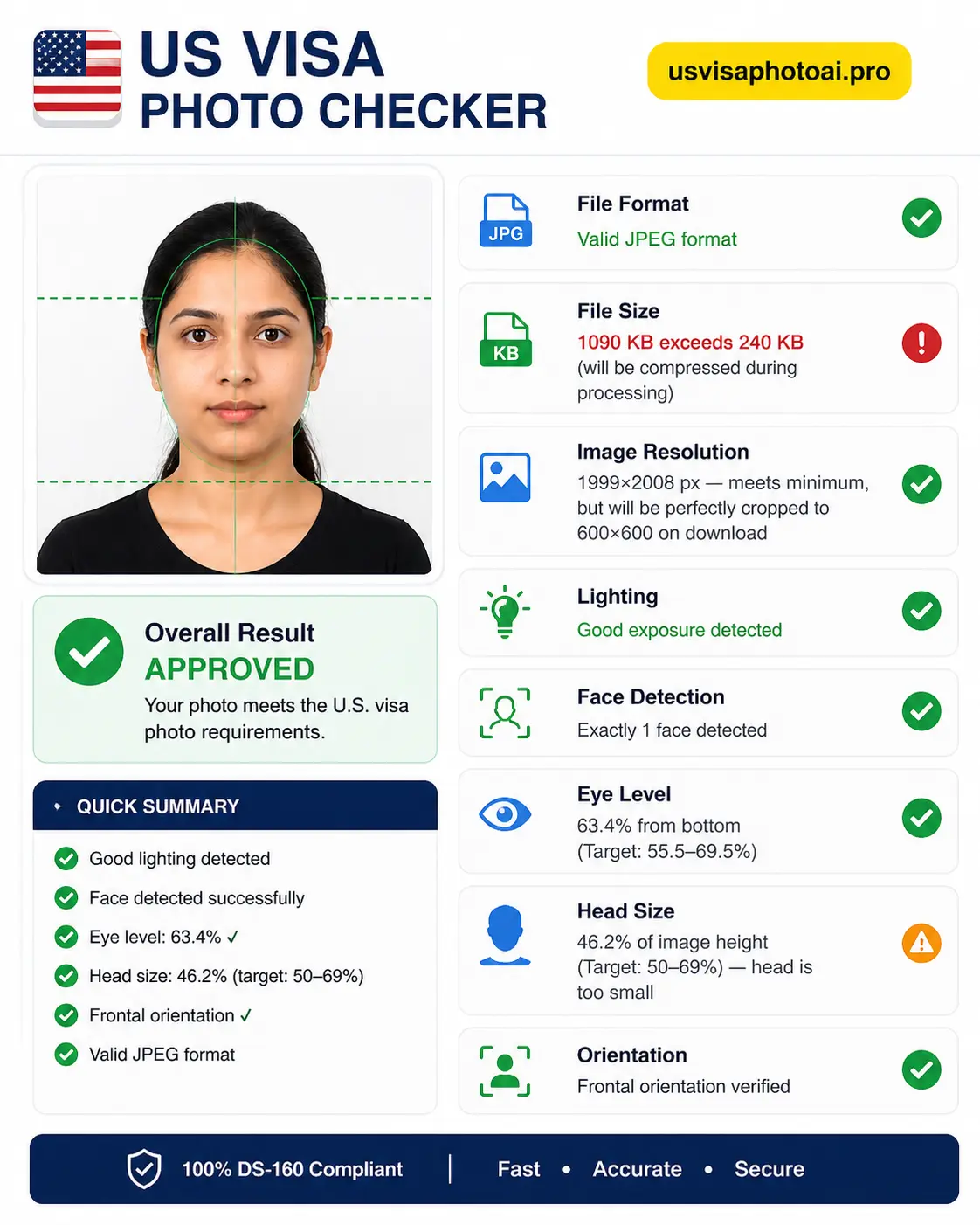
Here is what a real USVisaPhotoAI compliance report looks like, and what each result means for your application:
- File Format — Valid JPEG ✓ The CEAC portal only accepts true JPEG files. PNG, HEIC, and HEIF are automatically rejected. A renamed HEIC file with corrupted headers will trigger a 'File Must Be JPEG' error even with a .jpg extension.
- File Size — 1,090 KB (exceeds 240 KB) This photo would be silently rejected by the CEAC portal on upload. The State Department requires DS-160 photos to be under 240 KB. USVisaPhotoAI compresses the file to meet this limit automatically on download.
- Image Resolution — 1,999×2,008 px ✓ The resolution meets the minimum requirement. The image will be precisely cropped to 600×600 pixels on download without losing facial detail.
- Lighting — Good exposure detected ✓ Even, balanced lighting across the face. No harsh shadows detected over facial features.
- Face Detection — Exactly 1 face detected ✓ Required by the State Department: no other person should appear in the photo.
- Eye Level — 63.4% from bottom ✓ Falls within the required 56%–69% range. Facial landmark alignment is correct for biometric processing.
- Head Size — 46.2% of image height ✗ This is the one failure in this example. The State Department requires the head to occupy 50%–69% of the total image height. At 46.2%, the head is too small — the applicant was standing too far from the camera. This would trigger a size alert on the CEAC portal. The fix: step closer to the camera or have the photographer zoom in slightly, then retake.
- Orientation — Frontal orientation verified ✓ The applicant is facing the camera directly with no detectable head tilt. The State Department requires a clear, front-facing shot with the head horizontally centered.
⚠️ One Failure Is Enough for Rejection
In the example above, seven out of eight checks passed — but the head size failure alone is enough to cause a CEAC upload error or a consular rejection at the interview. The automated system checks all criteria simultaneously. A single out-of-range measurement triggers a flag regardless of how well everything else looks.
Cropping vs. Validating: Why They Are Not the Same Thing
Many apps will crop your photo to 600×600 pixels and call it done. But cropping only changes the canvas size — it does not verify whether your head is correctly positioned within that frame, whether your file is a true JPEG, whether shadows are present on the background, or whether your color profile is sRGB rather than Display P3. The State Department's own photo tool explicitly states it is for cropping only and does not check image quality. Validation means checking the data inside the photo — not just the shape of the file.
Why This Matters Even More for DV Lottery Entrants
For Diversity Visa Lottery applicants, the stakes of a non-compliant photo are especially high. According to the DV Program's official photo requirements, submitting a photo that has been manipulated or does not meet specifications will result in disqualification. Critically, there is no notification and no appeals process — your entry is simply invalidated and you cannot resubmit until the following year's lottery opens. Since January 2026, the State Department has also explicitly flagged AI-altered photos as grounds for disqualification under the DV program. A validation check before you submit is the only way to confirm your entry actually reaches the drawing.
How to Get the Most Accurate Result
- Upload your original, unedited file directly from your camera roll — not a screenshot, not a WhatsApp forward, not a previously cropped version. These have already lost pixel data the checker needs.
- Review your full PASS/FAIL report — each check shows a specific result with the measured value and the required range.
- Fix any failures before downloading — background issues and file size are corrected automatically. Head size failures require a retake with the camera positioned closer.
- Download your compliant photo — output is a true JPEG, under 240 KB, 600×600 px, in sRGB color space, ready to upload to ceac.state.gov.
Stop Guessing.
Perfect It in Seconds.
Our algorithm simulates the exact scanners used by the US Department of State. Ensure your 600x600 photo passes on the first try.