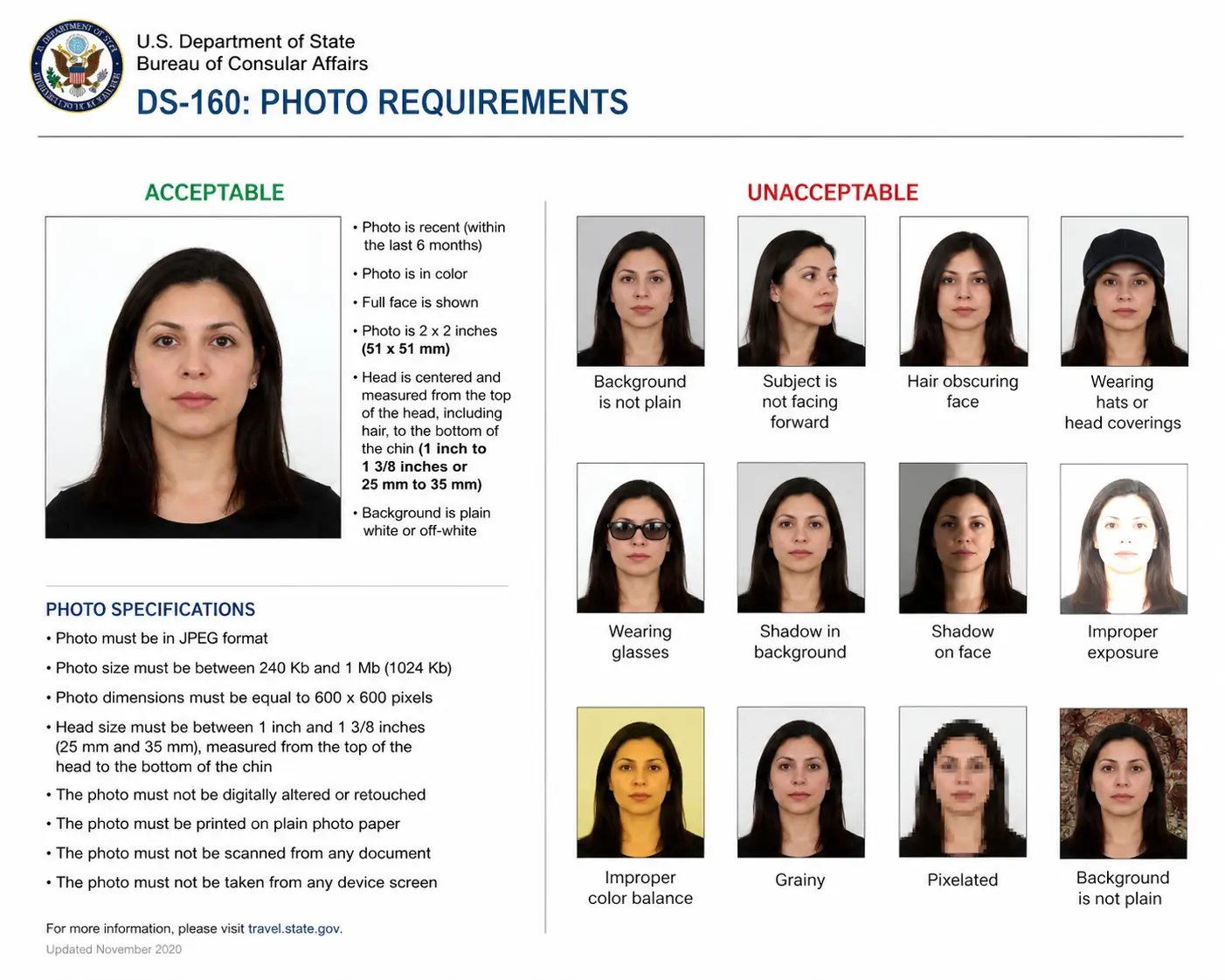
What Is the DS-160 — And Why Does Your Photo Matter So Much?
The DS-160 is the official online application form required for most US nonimmigrant visas. If you're applying for a tourist visa (B1/B2), student visa (F1), work visa (H-1B), exchange visitor visa (J1), or any other nonimmigrant category, you'll complete the DS-160 at ceac.state.gov. Your photo is uploaded as part of that process — and it's where most applicants unknowingly create problems for themselves.
During the DS-160 process, the system automatically checks whether the uploaded image meets the required size, format, and positioning standards. If the photo passes this automated validation, it becomes part of your visa record and is used during your interview and identity verification. Get it wrong, and your application stalls before a consular officer ever opens your file.
DS-160 Photo Technical Requirements
These are the exact digital file specifications required by the US Department of State for your US visa photo:
| Requirement | Specification | Why It Matters |
|---|---|---|
| File Format | JPEG (.jpg) only | PNG, HEIC, and HEIF are automatically rejected by the CEAC portal. |
| Dimensions | 600×600 pixels (square) | Ensures pixel density for facial mapping and biometric scanning. |
| File Size | Under 240 KB | The CEAC portal silently rejects oversized files with no clear error. |
| Color Space | sRGB | Display P3 and AdobeRGB files are automatically rejected — critical for iPhone Pro users. |
| Head Height | 50%–69% of image height | Centers face correctly for biometric scanning. |
| Eye Position | 56%–69% from bottom | Ensures correct facial landmark alignment. |
| Print Size | 2×2 inches (51×51 mm) | Required for physical copies at your visa interview. |
| Photo Age | Taken within last 6 months | Must reflect your current appearance per State Department rules. |
| Scan Resolution | 300 DPI (if scanning a print) | Scanning a 2×2 inch photo at 300 DPI produces the required 600×600px output. |
File Size: The Hidden Rejection Trap
This is the single most common reason DS-160 passport photo uploads fail. Your smartphone typically produces photos that are 2–5 MB in size — far above the 240 KB ceiling. The CEAC upload tool silently rejects oversized files, which means you may not even receive a clear error message. Your confirmation page will simply show an "X" where your photo should appear.
Always compress your photo below 240 KB before uploading — and always bring a printed 2×2 inch backup to your interview, as many embassies still request one even when the digital upload succeeds.
iPhone Users: One Extra Step Required
iPhone cameras default to HEIC or HEIF format — neither of which is accepted for DS-160 submissions. If you rename a HEIC file to .jpg without a proper conversion, the CEAC portal will reject it with a "File Must Be JPEG" error even though the extension looks correct. You must export a true JPEG from your Photos app before uploading. Additionally, modern iPhone Pro models shoot in Display P3 color space, which is also automatically rejected — your file must be in sRGB. A compliant visa photo maker like USVisaPhotoAI handles both the format conversion and color profile correction automatically.
Head Position and Face Framing
This is where most DIY US visa photos fail. Your head — measured from chin to the top of your hair — must occupy between 50% and 69% of the total image height. Too far back and the biometric system cannot lock onto your facial features. Too close and you will get a composition error.
Face the camera directly with a neutral expression and both eyes open. No angled shots, no chin tilted up or down. The photo must be in color — black and white photos are not accepted under any circumstances.
Background and Lighting Rules
The background must be plain white or off-white — no patterns, no textures, no objects in the frame. Shadows on the face or background are among the most common reasons a US visa photo gets flagged for rejection. Natural window light, with you facing toward the window, almost always produces the cleanest result when shooting at home.
💡 The White Shirt Mistake
Never wear a white shirt for your DS-160 photo. Since the background must be white, a white top blends right into it — making your head appear to float in the frame. This often triggers a Composition Error in the CEAC system. Wear a dark, contrasting color like navy or black instead.
Glasses, Head Coverings, and Accessories
Eyeglasses are not permitted in US visa photos. The US Department of State has prohibited glasses in passport and visa photos since 2016, regardless of whether you wear them daily. The only exception is a documented medical necessity — such as recent eye surgery — which requires a signed statement from a licensed medical professional. Religious head coverings are permitted provided your full face is completely visible with no shadows cast across it. Earbuds, headphones, and similar devices are not acceptable under any circumstances. Uniforms are not permitted, with the exception of religious clothing worn as part of a daily practice.
Can You Take Your Own DS-160 Photo at Home?
Yes — and many applicants do. However, photos must not be digitally enhanced or altered to change your appearance in any way. That means no filters, no skin smoothing, and no AI-generated background replacements. What you look like in the mirror is exactly what the photo must show. The acceptance of your photo always remains at the discretion of the US embassy or consulate where you apply.
The State Department does caution against selfie-style photos due to quality concerns. A phone photo can work if it meets all technical requirements — proper lighting, white background, correct dimensions, true JPEG format, and sRGB color space. For infant and toddler passport photo requirements, lay your baby on their back on a plain white sheet to support their head and eliminate background shadows.
DS-160 Photo Checklist
- ✓ Square JPEG, 600×600 pixels, under 240 KB
- ✓ sRGB color profile (not Display P3 or AdobeRGB)
- ✓ Taken within the last 6 months
- ✓ Plain white or off-white background
- ✓ No shadows on face or background
- ✓ Neutral expression, both eyes open
- ✓ Facing camera directly, no head tilt
- ✓ Head fills 50%–69% of image height
- ✓ Color photo — not black and white
Common Mistakes to Avoid
- ✗ File over 240 KB (most common failure)
- ✗ HEIC or HEIF format instead of true JPEG
- ✗ Display P3 or AdobeRGB color profile
- ✗ Glasses (prohibited since 2016 unless medical exemption)
- ✗ White shirt blending into background
- ✗ Shadows on face or wall
- ✗ Head tilted, angled, or off-center
- ✗ Filters, skin smoothing, or background edits
- ✗ Earbuds, headphones, or non-religious head covering
What Happens If Your Photo Is Rejected?
If your DS-160 confirmation page shows an "X" instead of your photo, you must bring one printed 2×2 inch photo to your visa interview along with the confirmation page. The embassy or consulate will attach it to your application manually. If a consular officer then rejects that printed photo at the interview, you will typically be directed to a nearby photo studio — adding hours to your appointment and potentially forcing a full reschedule. For applicants traveling from outside the city where the consulate is located, that is a significant cost in both time and money.
The simplest way to avoid this entirely is to verify your photo before you upload. USVisaPhotoAI instantly checks your image against the same criteria the CEAC system uses — dimensions, file size, sRGB color profile, head positioning, background color, shadow detection, and biometric facial landmarks. Upload once, upload right, and keep your US visa process on track.
Stop Guessing.
Perfect It in Seconds.
Our algorithm simulates the exact scanners used by the US Department of State. Ensure your 600x600 photo passes on the first try.