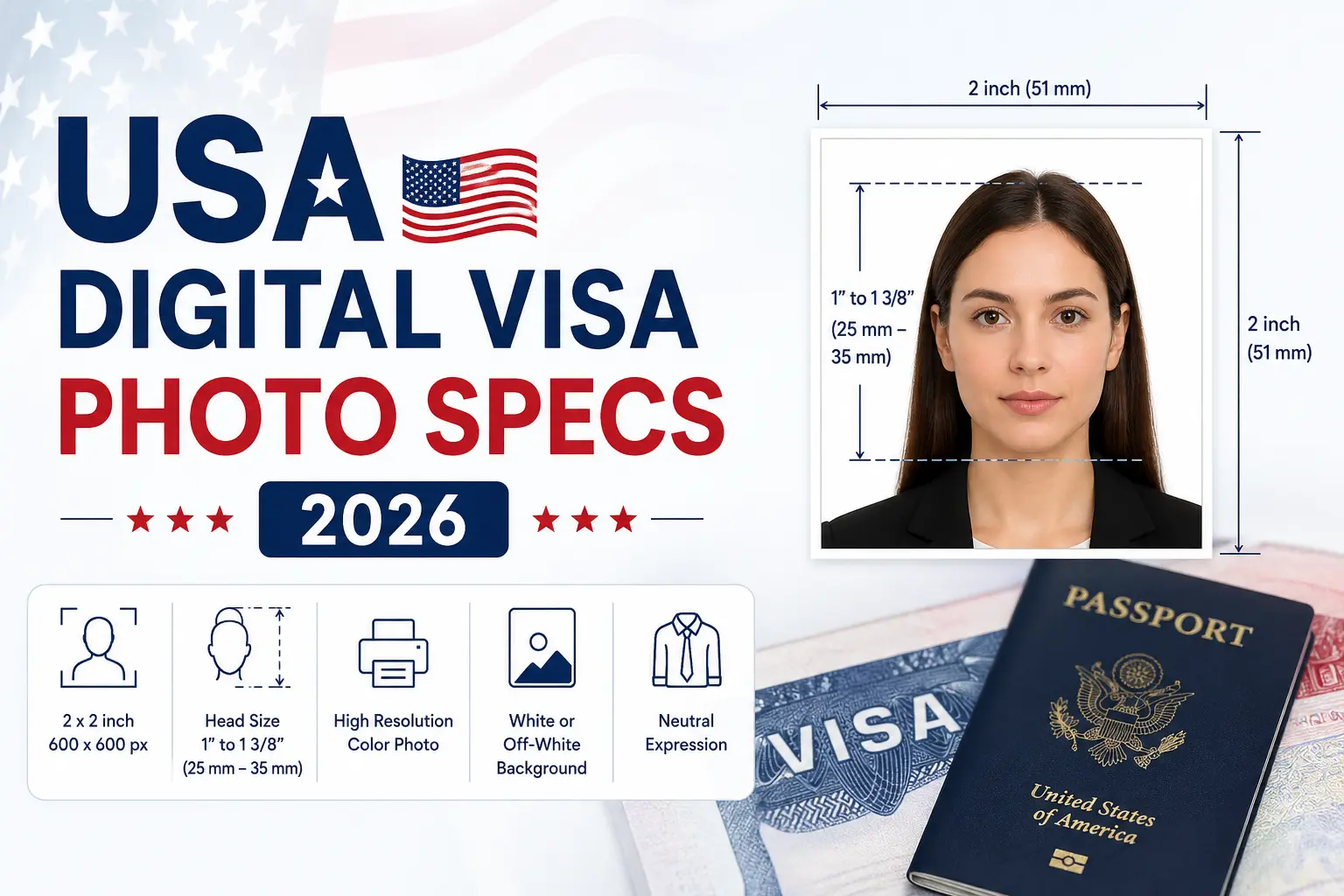
Official Digital US Visa Photo Requirements for DS-160 in 2026
Uploading your photo to the Consular Electronic Application Center (CEAC) at ceac.state.gov is one of the most technically strict steps in your US visa application. The CEAC portal automatically validates every file against a precise set of digital specifications set by the US Department of State — and a file that is even slightly out of spec will be rejected before a consular officer ever sees your application. This guide covers every verified technical requirement for the DS-160 digital photo upload in 2026, sourced directly from the US Department of State's official photo guidelines and the Foreign Affairs Manual (9 FAM 403.9-4).
The DS-160 is the standard Online Nonimmigrant Visa Application used for all nonimmigrant visa categories processed by US embassies and consulates worldwide — including the B-1/B-2 tourist and business visa, F-1 student visa, H-1B and H-2B work visas, J-1 exchange visitor visa, L-1 intracompany transfer visa, O-1 extraordinary ability visa, and all others. The same photo specifications apply to every category — there are no category-specific digital photo rules.
DS-160 Digital Photo — 2026 Official Specifications
Pixel Dimensions — Square Format is Mandatory
The CEAC portal requires a perfectly square image — the width and height must be exactly equal. The accepted range is 600 × 600 pixels minimum to 1200 × 1200 pixels maximum. Any rectangular image, regardless of quality or content, will be automatically rejected by the portal. Most smartphones produce photos that already exceed 600 × 600 pixels — the challenge is almost never the pixel count. It is always the file size and aspect ratio. If you are scanning a previously printed 2 × 2 inch (51 × 51 mm) US passport photo to create a digital file, the State Department specifies a scanning resolution of 300 pixels per inch, which produces the minimum-acceptable 600 × 600 pixel output.
File Size — The 240KB Hard Ceiling
The DS-160 portal enforces a maximum file size of 240 kilobytes (KB). This is a hard limit — files over 240KB are blocked from upload. A raw photo from a modern smartphone is typically 3–8 megabytes (3,000–8,000KB), far exceeding the limit. The photo must be compressed before upload. However, the State Department also specifies a maximum JPEG compression ratio of 20:1. This means you cannot use aggressive "low quality" compression settings that create visible blocking, smearing, or banding artifacts in the image. Visible compression artifacts are a sign that the 20:1 limit has been exceeded and the photo may be rejected during manual consular review, even if it passes the automated upload check. The practical target is to compress the file to well under 240KB while keeping the image visually sharp and free of visible artifacts.
File Format — JPEG Only, No Exceptions
Only JPEG (.jpg) format is accepted for DS-160 digital photo uploads. PNG, WebP, BMP, HEIC, and HEIF formats are all rejected. This is a critical issue for iPhone and newer Android users: modern iOS devices save photos in HEIC format by default, not JPEG. Uploading an HEIC file to the CEAC portal will result in immediate rejection. You must convert your photo to JPEG before uploading. This can be done for free using Windows Photos, Apple Preview, or any standard photo editing application. Note that HEIC and HEIF formats are only accepted for the separate online passport renewal program at MyTravelGov — they are not accepted for DS-160 or any visa-related upload at CEAC.
Color Space and EXIF Metadata — A Critical Technical Detail
The photo must be a full-color 24-bit image using the sRGB color space. This is the standard color profile used by most digital cameras and older smartphones. However, newer iPhones and some high-end Android devices capture photos in the Display P3 color space — a wider color gamut that is not accepted by the CEAC portal. If you upload a Display P3 JPEG to the DS-160, the portal may reject it with a color space error or produce a color-distorted image in your application record. The solution is to convert your image's color profile to sRGB in a photo editing tool before uploading.
The State Department also specifies that EXIF metadata must be preserved in the submitted file. EXIF data is embedded technical information about the image — including the camera model, date and time, and critically, the sRGB ICC color profile tag and EXIF rotation flag. Many online photo editors, compression tools, and privacy-focused apps automatically strip EXIF metadata to reduce file size. If the sRGB ICC profile tag is removed, the portal may trigger a color-space rejection. If the rotation flag is lost, the image may appear rotated or fail the portal's orientation check. Always use a tool that preserves EXIF data when editing your DS-160 photo.
DPI Does Not Apply to Digital Photo Submissions
A common source of confusion is the role of DPI (dots per inch) in digital photo submissions. DPI is a print concept, not a screen concept. The CEAC portal does not check the DPI setting of a digital file — it checks only the pixel dimensions and file size. Whether your JPEG file is tagged at 72 DPI, 96 DPI, or 300 DPI makes no difference whatsoever to the DS-160 upload. DPI only becomes relevant in one specific case: if you are scanning a previously printed 2 × 2 inch passport photo to create a digital file. In that case, you must scan at 300 DPI to produce the minimum 600 × 600 pixel output. For any natively digital photo, ignore DPI entirely and focus only on pixel dimensions and file size.
Appearance Requirements — Same as Printed US Visa Photos
The visual content of the DS-160 digital photo must meet the same appearance standards as printed US visa and passport photos, as specified in the Foreign Affairs Manual (9 FAM 403.9-4). The background must be plain white or off-white — no patterns, shadows, gradients, or objects. The photo must show a full front view of the face, with both ears clearly visible. The expression must be neutral with the mouth closed — no smiling, no frowning. The eyes must be open and looking directly at the camera. Glasses have not been permitted in US visa photos since November 2016 — this applies to prescription glasses, fashion glasses, and all eyewear. A signed medical statement is required for the rare medical exemption. Head coverings are not permitted unless worn daily for religious purposes, and the complete face from forehead to chin must be fully visible. No digital enhancement, beauty filters, AI skin smoothing, or background alterations of any kind are permitted.
DS-260 Immigrant Visa — Different Photo Process
The DS-260 is the immigrant visa application form used by the National Visa Center (NVC) for green card and family-based immigration cases. Unlike the DS-160, the DS-260 does not require a digital photo upload during the online application. Instead, immigrant visa applicants must bring two identical printed 2 × 2 inch (51 × 51 mm) photos to their immigrant visa interview at the US embassy or consulate. These printed photos must be on high-quality matte or glossy photo paper, in full color, taken within six months of the interview date, and must meet all standard US visa photo appearance requirements including no glasses, white or off-white background, and neutral expression.
Diversity Visa (DV) Program Digital Photo Requirements
The Diversity Visa Lottery (DV Program) requires a digital photo upload during the online entry submission. The DV Lottery photo must be JPEG format, exactly 600 × 600 pixels, and under 240KB — the same format and file size limit as DS-160, but with a fixed pixel dimension rather than a range. All visual appearance requirements are identical to standard US visa photos. DV Lottery selectees who are called for an interview must also bring two identical printed 2 × 2 inch photos to the consular interview, meeting the same printed photo standards as DS-260 applicants.
Free State Department Photo Tool
The US Department of State provides a free official photo cropping tool at tsg.phototool.state.gov/photo. This tool allows you to upload a photo from your phone or computer and crop it to the correct 600 × 600 pixel square format. It verifies head positioning and basic compliance. Note that the tool assists with cropping only — a State Department employee makes the final determination of whether the photo is acceptable at the time of interview.
DS-160 vs DS-260 vs DV Lottery — Photo Comparison 2026
2026 DS-160 Digital Photo Upload Checklist
- Format: JPEG (.jpg) only — no PNG, HEIC, WebP, or BMP accepted.
- Dimensions: Square only; 600×600 px minimum to 1200×1200 px maximum.
- File size: 240KB maximum hard limit.
- Compression: Maximum 20:1 ratio — no visible blocking or artifacts.
- Color space: 24-bit sRGB — convert from Display P3 if using a newer iPhone.
- EXIF data: Must be preserved — do not use tools that strip metadata.
- Background: Plain white or off-white — no patterns, shadows, or objects.
- Face: Full front view, both ears visible, centered in frame.
- Expression: Neutral — mouth closed, no smile.
- Eyes: Open, looking directly at camera, no red-eye.
- Glasses: Not permitted since November 2016 — remove all eyewear.
- DPI: Irrelevant for digital submissions — focus on pixel count and file size only.
- HEIC users: Convert to JPEG before upload — iPhones default to HEIC format.
- Recency: Photo taken within 6 months of application date.
- Retouching: Strictly prohibited — no filters, AI edits, or background manipulation.
CEAC-Ready. First Upload. Zero Rejections.
Our tool outputs a DS-160-compliant JPEG at 600×600 pixels, under 240KB, in 24-bit sRGB color space, with preserved EXIF metadata and white background — ready to upload to ceac.state.gov without errors. Works for all nonimmigrant visa categories: B-1/B-2, F-1, H-1B, J-1, L-1, O-1, and more.
Stop Guessing.
Perfect It in Seconds.
Our algorithm simulates the exact scanners used by the US Department of State. Ensure your 600x600 photo passes on the first try.