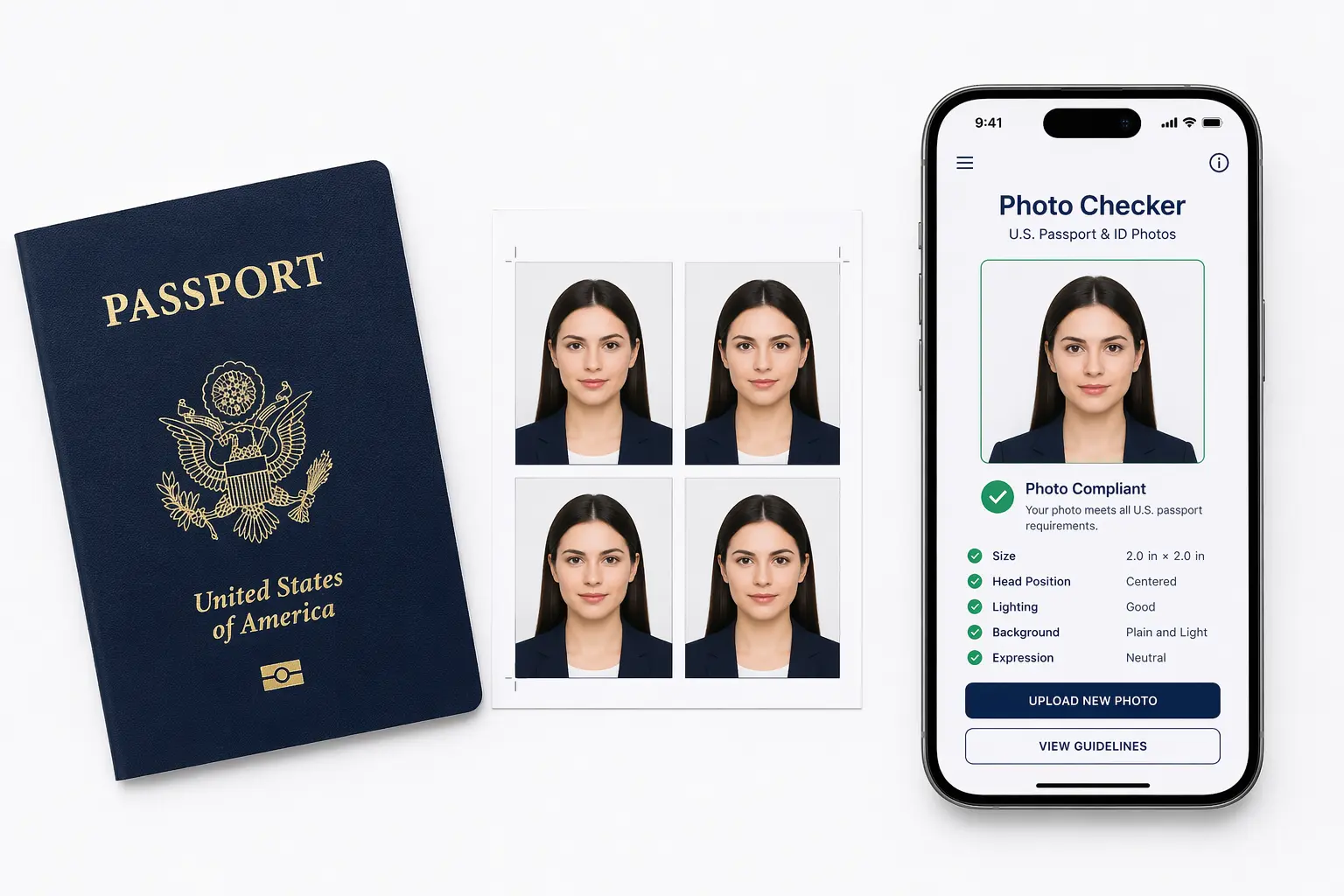
US Visa & Passport Photo Requirements 2026: The Complete Guide (DS-160, DV Lottery 2027, Green Card, Passport)
Whether you're applying for a US visa using the DS-160 form, entering the DV Lottery 2027, filing for a green card, or renewing your US passport, your photo is one of the most scrutinized parts of your application. Get it wrong and your application gets rejected — sometimes without a clear explanation.
This 2026 guide covers every photo requirement, every common mistake, and the best free photo checker tools available — all in one place. Bookmarkable and shareable.

1. Free US Visa & Passport Photo Checker Tools (2026)
Before we dive into the rules, here are the most-used free tools for checking and creating compliant photos. These tools automatically verify size, background, face position, and lighting — saving you hours of guesswork.
Official US Government Photo Tools
| Tool | Purpose | URL |
|---|---|---|
| State Department Photo Tool | US Passport & Visa Photos | tsg.phototool.state.gov |
| DS-160 Photo Tool | Nonimmigrant Visa Photos | ceac.state.gov/genniv |
| DV Lottery Photo Tool | DV-2027 Diversity Visa Photos | dvprogram.state.gov |
| USCIS Photo Tool | Green Card / Immigration Photos | uscis.gov |
AI-Powered Photo Checker Tools
For a more intelligent check that catches subtle problems like shadow under the chin, slight head tilt, or off-white backgrounds, AI-powered tools give you instant feedback:
- usvisaphotoai Photo Checker — Checks DS-160, DV Lottery, green card, and passport photos in seconds using AI. Free to use. Try it here →
- US Visa Photo Validator — Upload your photo and get instant pass/fail feedback with explanation.
- ICAO Photo Checker — Checks compliance against international passport photo standards used by most countries.
Always check your photo before submitting your application. The official DS-160 system and DV Lottery portal both run automated photo validation — if your photo fails, your application may be rejected without refund.
2. US Visa Photo Requirements 2026 (DS-160)
Applying for a US nonimmigrant visa (tourist, student, work, etc.)? Your photo must meet very specific standards set by the US Department of State.
Digital Photo Specifications for DS-160
| Specification | Requirement |
|---|---|
| Photo Size | 600 × 600 pixels (minimum), 1200 × 1200 (maximum) |
| File Format | JPEG (.jpg) only |
| File Size | Maximum 240 KB |
| Background | Plain white or off-white, no shadows |
| Face Coverage | 50%–69% of image height |
| Eye Position | 56%–69% from bottom of image |
| Recency | Taken within the last 6 months |
| Expression | Neutral, mouth closed |
| Glasses | Not allowed (as of 2016) |
Face & Head Positioning Rules
- Full face must be visible — from chin to crown of head
- Head must face the camera directly — no tilting or turning
- Both eyes must be open, clearly visible, and in focus
- Mouth should be closed (no smiling)
- The head, including hair, must not be cut off at the edges
US Visa Photo: What to Wear
There's no rigid dress code, but these guidelines apply:
- ✅ Wear everyday clothes — business casual is ideal
- ✅ Choose dark or medium-toned clothing for good contrast against the white background
- ❌ Do not wear white, cream, or very light-colored tops (blends into background)
- ❌ Do not wear uniforms (military, police, scrubs) unless required by law
- ❌ Do not wear hats, caps, or head accessories (religious exception applies)
3. US Passport Photo Requirements 2026
US passport photo requirements are enforced both for new applications and renewals. The State Department uses automated facial recognition systems — if your photo doesn't match the criteria, your application is returned.
Printed Passport Photo Specifications
| Requirement | Standard |
|---|---|
| Print Size | 2 × 2 inches (51 × 51 mm) |
| Head Height | 1 to 1⅜ inches (25–35 mm) from chin to top of head |
| Background | Plain white or off-white |
| Photo Paper | Matte or glossy photo-quality paper |
| Color | Color photo required (not black and white) |
| Digital Resolution | Minimum 600 DPI for printed photos |
Why Is My Passport Photo Black and White?
A common concern: if your printed passport photo looks black and white or sepia-toned, your printer settings may be wrong. US passport photos must always be in full color. Check your printer is set to color output, and use photo-quality paper — not regular office paper. The State Department will reject black and white, faded, or pixelated photos.
US Passport Photo UK & Europe Applicants
If you're a US citizen living in the UK or Europe and need to renew your US passport, the same 2×2 inch / 600×600 pixel standards apply. You can take the photo yourself at home or use a local photo shop — just ensure they follow US requirements, not UK passport photo standards (which are different in size).
Does a Passport Application Have to Be Printed in Color?
Yes. The entire passport application form (DS-11 or DS-82) and your supporting photo must be printed in color. Printing in grayscale is not acceptable. The photo specifically must accurately represent your skin tone and features.
4. DV Lottery 2027 Photo Requirements (DV-2027)
The Diversity Visa Lottery for 2027 (DV-2027) has strict photo requirements that are checked automatically by the dvprogram.state.gov system. Incorrect photos are one of the top reasons DV entries are disqualified — even when all other information is correct.
DV-2027 Photo Specifications
- Format: JPEG only
- Dimensions: Minimum 600 × 600 pixels
- File size: 240 KB maximum
- Background: White or off-white, no shadows
- Recency: Taken within 6 months of submission
- Each family member must have their own separate photo
DV Lottery Photo Checker Tools
The official DV Lottery portal checks your photo automatically on upload. However, you should use a pre-submission photo checker to catch problems before they cause a disqualification:
- Use the usvisaphotoai DV Photo Checker for AI-based validation
- The official edv photo tool at dvprogram.state.gov provides basic size and format checks
- Always test your photo before the DV Lottery deadline — entries cannot be re-submitted once submitted
You can only submit one DV entry per person. Multiple entries result in disqualification. Make sure your photo is perfect before submitting — you won't get a second chance.
5. Green Card Photo Requirements 2026
When applying for a green card (lawful permanent residency) through USCIS, your photos must meet specific standards. Whether you're applying via family sponsorship, employment, the DV Lottery, or another category, the photo rules are the same.
Green Card Photo Specifications
| Requirement | Standard |
|---|---|
| Number of Photos | 2 identical photos required |
| Print Size | 2 × 2 inches |
| Background | White or off-white |
| Face Position | Directly facing camera |
| Expression | Neutral, eyes open |
| Digital Size | 600 × 600 to 1200 × 1200 pixels |
Green Card Photo Checker
USCIS uses the same biometric standards as the State Department. Use the USCIS photo check tool or an AI-powered checker like usvisaphotoai to verify:
- Correct face-to-frame ratio
- No shadows on face or background
- Even, bright lighting
- Correct image size and format
The size of photo for green card when printed is always 2×2 inches. Digitally, it must be square (600–1200 pixels per side).
6. Background Rules: White, Off-White, Light Grey & What's Rejected
Background rules are one of the most misunderstood parts of passport and visa photo requirements. Here's exactly what the US government accepts and rejects.
Accepted Backgrounds
- ✅ Pure white — the safest choice
- ✅ Off-white — slightly warm white, acceptable
- ✅ Very light grey — accepted in some cases but risky
Rejected Backgrounds
- ❌ Any colored background (blue, grey, cream, beige)
- ❌ Patterned or textured walls
- ❌ Shadows on the background wall
- ❌ Objects or furniture visible in background
- ❌ Outdoor backgrounds
Is a Light Grey Background Acceptable for Passport Photos?
This is a very common question. For US passport and visa photos, the official rule requires white or off-white. A light grey background passport photo is technically non-compliant for US applications, even though some countries (like the UK) allow it. When in doubt, always use plain white.
Studio Backgrounds for Passport Photos
Professional photo studios often use seamless white paper backdrops or light grey muslin — when properly lit, these produce an acceptable white background. The key is the final result, not the physical background color. If the background in your final photo appears white and shadow-free, it will likely pass.
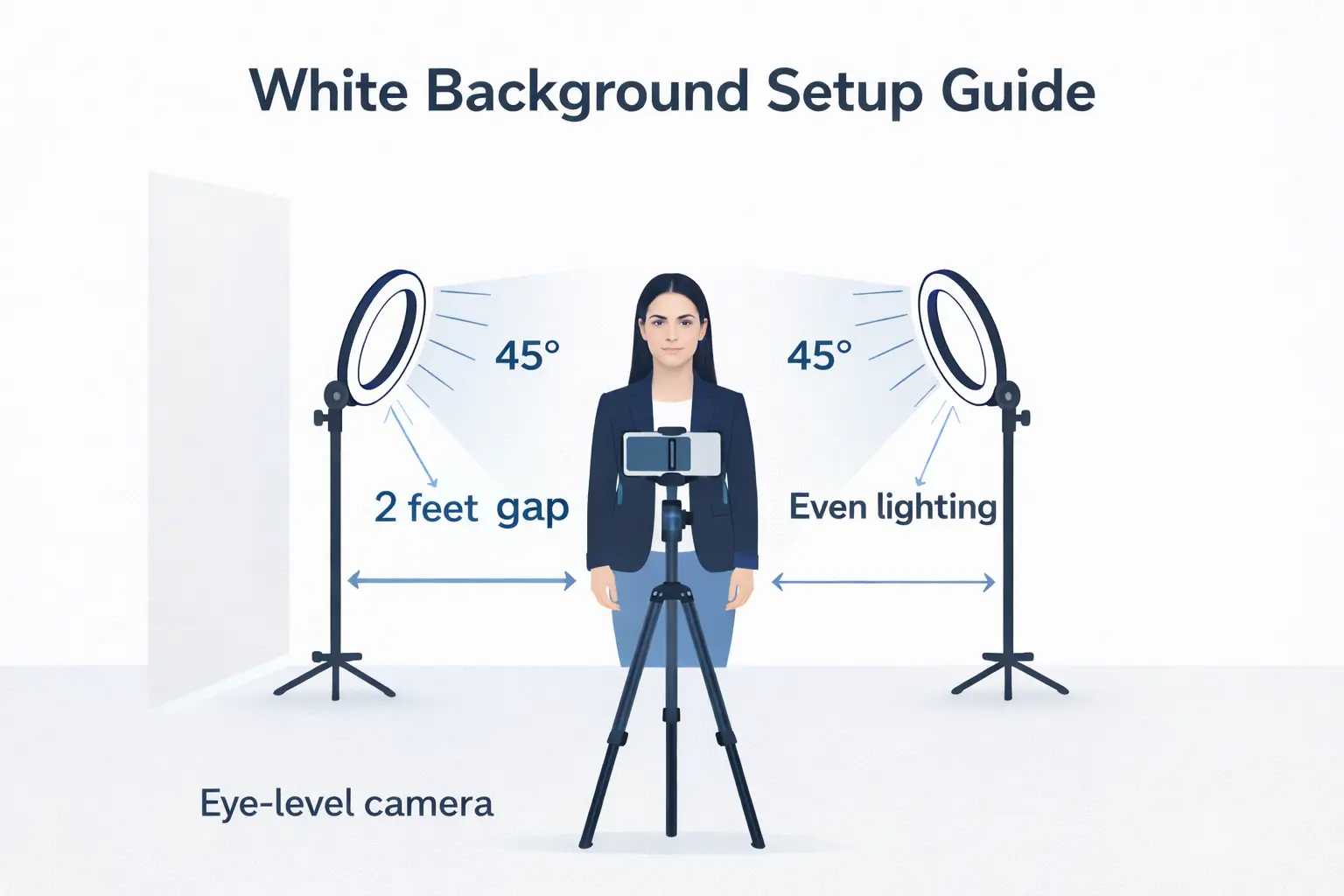
White Background at Home
To create a white background for passport photos at home:
- Tape a large white sheet of paper or foam board to a wall
- Stand at least 18–24 inches away from the background
- Use two light sources (or face a window) to illuminate evenly
- Avoid standing too close — this creates shadows behind you
7. How to Avoid Shadows in Passport & Visa Photos
Shadow problems are the #1 cause of photo rejection in passport and visa applications. Shadows can appear on your face, neck, background, or even just under your chin — and automated systems catch all of them.
Types of Shadow Problems
- Shadow on background — caused by standing too close to the wall
- Shadow under chin — caused by overhead lighting or downward-angled camera
- Shadow on neck (passport photo shadow on neck) — often caused by poor lighting angle
- Facial shadow — one side of face darker than other, caused by single light source
How to Avoid Shadows Step by Step
- Distance from wall — Stand at least 2 feet from the background. The farther you are, the less shadow falls on the wall behind you.
- Two-light setup — Place one light source on each side of your face at a 45-degree angle. This eliminates side shadows.
- Natural light — Face a large window with diffused daylight. Avoid direct sunlight, which creates harsh shadows.
- Camera position — Keep the camera at eye level. If the camera is above you, it creates shadow under your chin.
- No hair falling over face — Tied-back hair reduces shadows on your face.
Can a Passport Photo Have a Shadow?
No. US passport and visa photos must have no visible shadows — not on the background, not on the face, not under the chin, and not on the neck. Even a "slight shadow in passport photo" can cause automated rejection. If you're unsure, use a free photo checker tool before submitting.
8. Infant & Baby Passport Photo Requirements (Newborn Included)
Baby passport photos are notoriously difficult to get right. The rules are slightly relaxed for infants, but the core requirements still apply.
Infant Passport Photo Rules 2026
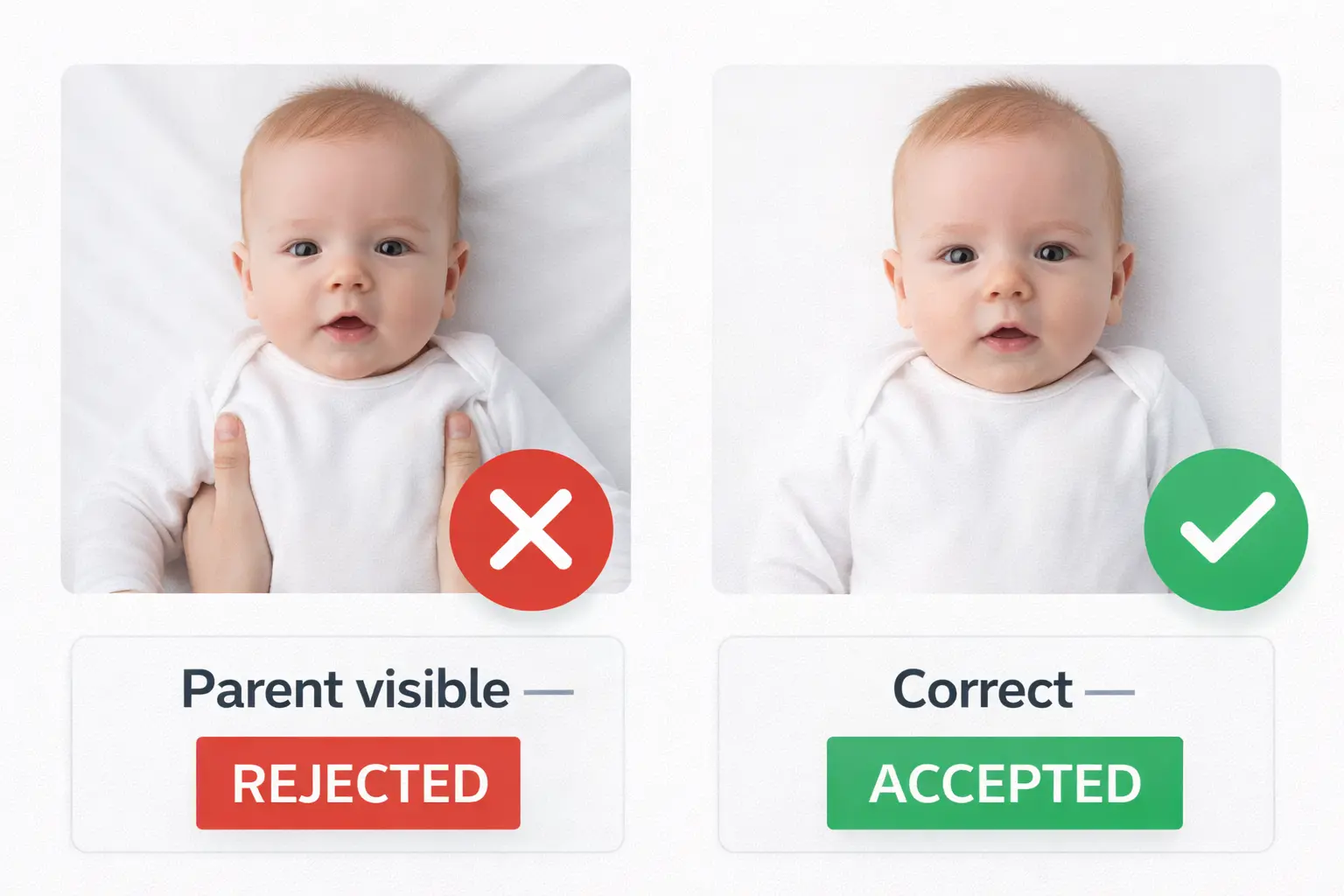
- ✅ Baby must be alone in the photo — no parent's hands, arms, or body visible
- ✅ Face should be directly facing the camera
- ✅ Eyes should be open if possible (closed eyes accepted for very young infants)
- ✅ White or off-white background required
- ❌ No car seats, strollers, or furniture visible
- ❌ No shadows from holding parent
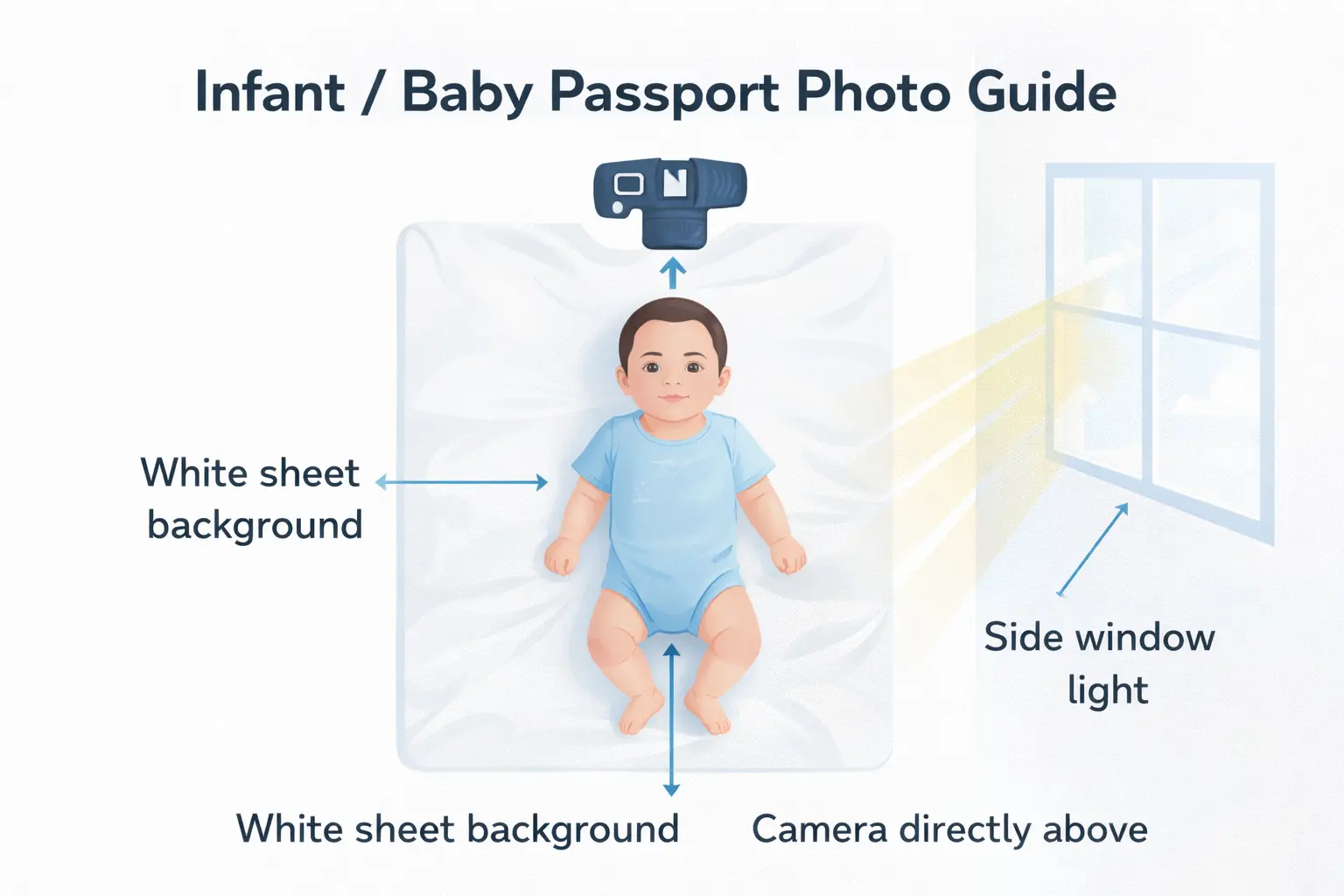
How to Take a Baby Passport Photo at Home
- Lay a white sheet or foam board flat on a clean surface
- Place the baby on their back on the white surface
- Stand directly above with your camera pointed straight down
- Make sure the baby's face is visible and not obscured
- Use natural light from a window beside you (not above)
- Take multiple shots and choose the sharpest one with the baby looking toward the camera
Newborn Passport Photo Requirements
For newborns, the State Department allows some flexibility — eyes do not have to be fully open. However, the photo still must show a clear face, no parent visible, and a white background. Some passport acceptance facilities will take the photo for you — call ahead and ask.
9. Glasses, Head Coverings, Jewelry & Accessories
Glasses in Passport & Visa Photos
As of 2016, the US State Department does not allow glasses in passport or visa photos. This applies even to:
- Clear or lightly tinted lenses
- Thin frames with minimal obstruction
- Prescription glasses you wear every day
The reason is simple: glasses cause glare, reflections, and can obscure parts of the eyes — all of which interfere with biometric facial recognition. Remove your glasses for every US travel document photo.
Head Coverings in Passport Photos
Head coverings are allowed only in these specific circumstances:
- Religious reasons (hijab, turban, yarmulke, etc.)
- Medical reasons (hair loss from chemotherapy, etc.)
Even with a religious or medical head covering:
- Your full face must be visible from chin to forehead
- No shadows should be cast on your face
- The covering cannot obscure your hairline if it would normally be visible
Jewelry & Other Accessories
- Small earrings are acceptable
- Large necklaces and chunky jewelry should be avoided
- Hearing aids are acceptable
- Do not wear costumes or novelty accessories
10. Digital Passport Photos: How to Get One in 2026
More and more passport and visa applications are going fully digital. Here's everything you need to know about getting a proper digital passport photo.
What Is a Digital Passport Photo?
A digital passport photo is a JPEG image file that meets the same composition requirements as a printed photo — correct face positioning, white background, proper sizing — but submitted electronically rather than on paper. For DS-160 applications and DV Lottery entries, digital photos are always required.
Where to Get a Digital Passport Photo
- Take it yourself at home — Follow the setup guide above and use an AI tool to crop and validate
- Use an AI photo tool — Services like usvisaphotoai convert any selfie into a compliant digital passport photo automatically
- CVS, Walgreens, or post office — These stores take photos and can provide digital copies on a USB drive or by email upon request
- Online photo services — Many services mail printed photos and email digital copies
How to Get a Digital Copy of Your Passport Photo
If you have an existing printed passport photo and need a digital copy:
- Scan the photo at 600 DPI or higher using a flatbed scanner
- Or photograph it with your phone in good lighting, then crop to square
- Convert the file to JPEG and ensure it meets the 600×600 pixel minimum
- Run it through a photo checker to confirm compliance
11. Printing Passport Photos: CVS, Paper Type & More
Does CVS Print 2×2 Photos?
Yes — CVS Photo Centers print 2×2 passport photos. You can use their in-store kiosks or order online for in-store pickup. The standard option is two prints on a 4×6 sheet. As of 2026, CVS typically charges around $16–18 for two passport photos with same-day service.
Does Walgreens Print Passport Photos?
Yes, Walgreens also offers passport photo printing at most locations. Pricing is similar to CVS. Both stores use glossy photo paper that meets US passport requirements.
Does the Passport Photo Have to Be on Photo Paper?
Yes. For printed passport applications, photos must be printed on photo-quality paper — either glossy or matte. Regular office paper or inkjet paper is not acceptable. The photo must not be:
- Printed on regular copy paper
- Attached with tape or staples (it should be loose)
- Digitally altered beyond basic cropping and brightness
Passport Photo Resolution
For printing, your photo should be at least 600 DPI (dots per inch). At 2×2 inches and 600 DPI, that's 1200×1200 pixels — which aligns with the digital maximum of 1200×1200 specified by the State Department. Higher is fine; lower leads to a blurry, pixelated photo that will be rejected.
12. ICAO International Passport Photo Standards 2024
ICAO (the International Civil Aviation Organization) sets the global standards for machine-readable travel documents, including passport photos. The US follows ICAO standards closely.
Key ICAO Requirements
- Face zone — 70–80% of the image height must be face (chin to crown)
- Neutral expression — Eyes open, mouth closed
- No shadows — Background and face must be evenly lit
- Color balance — Skin tones must be accurately represented
- Resolution — Minimum 300 DPI (600+ recommended)
ICAO Photo Check Tool
If you're applying for travel documents from multiple countries, use an ICAO photo checker that validates against the international standard. Most AI-powered passport photo tools (including usvisaphotoai) validate against ICAO standards automatically.
UK Passport Photo Requirements vs US Requirements
UK passport photo requirements differ from US requirements in several ways:
| Feature | US Passport | UK Passport |
|---|---|---|
| Print size | 2 × 2 inches | 35 × 45 mm |
| Background | White or off-white only | Light grey acceptable |
| Expression | Neutral (no smile) | Neutral (no smile) |
| Glasses | Not allowed | Not allowed |
If you need both a US passport and a UK passport photo, you must get two separate sets of photos taken to different specifications. Do not try to use the same photo for both.
13. Most Common Rejection Reasons & How to Fix Them
Understanding why photos get rejected is the fastest way to get yours right. Here are the most frequent failure reasons caught by automated photo checking systems:
| Rejection Reason | Fix |
|---|---|
| ❌ Shadow on background | Stand farther from wall; add a second light source |
| ❌ Face too small or too large | Recrop — face must be 50–69% of image height |
| ❌ Photo too dark | Use brighter/more even lighting; face a window |
| ❌ Blurry or out of focus | Use a tripod or rest phone on a stable surface |
| ❌ Glasses in photo | Remove glasses entirely |
| ❌ Wrong file format or size | Convert to JPEG; ensure 600–1200px square, under 240KB |
| ❌ Not a recent photo | Take a new photo — must be within 6 months |
| ❌ Head tilted or turned | Face directly forward; use a mirror for alignment |
| ❌ Colorful or patterned background | Use AI background removal tool or reshoot on white |
| ❌ Photo digitally altered | No filters, beauty modes, or AI face enhancement allowed |
The "Failure" Problem: Why Photos Keep Getting Rejected
If your photo keeps failing the automated checker, the problem is usually one of three things: lighting (shadows or darkness), positioning (face too small or off-center), or format (wrong pixel size or file too large). Use a step-by-step photo checker tool to pinpoint the exact issue before retaking.
Quick Reference: US Passport & Visa Photo Checklist
- Photo is JPEG format
- Image is square: 600×600 to 1200×1200 pixels
- File size is under 240 KB
- Background is plain white or off-white
- No shadows on background or face
- Face takes up 50–69% of image height
- Eyes are clearly visible and open
- Expression is neutral, mouth closed
- No glasses
- No hat (unless for religious/medical reasons)
- Photo taken within the last 6 months
- No heavy filters or editing applied
Conclusion: Get Your Photo Right the First Time
Whether you're submitting a DS-160 visa application, entering the DV Lottery 2027, applying for a green card, or renewing your US passport, your photo is the first thing the system checks — and one of the most common causes of delays and rejections.
The good news: following the rules is straightforward once you know them. Use the checklist above, shoot in good light against a white background, stay at least 2 feet from the wall, and run your photo through a checker before submitting.
If you want to skip the guesswork entirely, use an AI photo tool that handles cropping, background, and validation automatically.
👉 Check your photo now: usvisaphotoai Free Photo Checker & Creator
Expert Q&A
Avoid Common Rejections Instantly
Our AI ensures your photo meets 2026 biometric standards: perfect 600x600 size, correct head ratio, and pure white background.
Fix My Photo Now